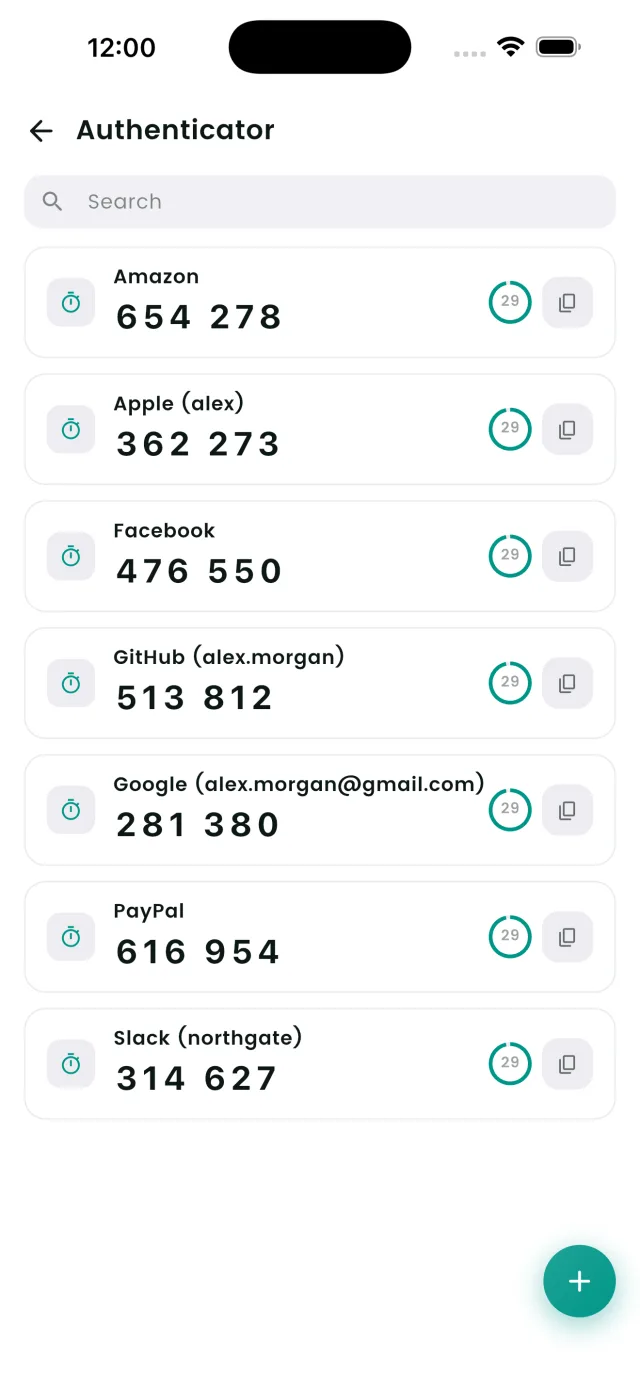
Two-factor authentication (2FA) is one of the best things you can do to protect your accounts — but juggling a separate authenticator app is a hassle. DroidPass now has a built-in authenticator that generates your one-time codes right next to the passwords they protect.
What is a built-in authenticator?
An authenticator generates time-based one-time passwords (TOTP) — the 6-digit codes that change every 30 seconds when you log in to a site with 2FA enabled. Normally these live in a separate app like Google Authenticator or Authy. With DroidPass, they live inside the same encrypted vault as your passwords, so logging in is a single, simple flow.
Why keep 2FA codes in your password manager?
- One app, one unlock. Your password and your 2FA code are in the same place, protected by the same Master PIN and Face ID.
- Encrypted and synced. Your authenticator secrets are protected with AES-256 encryption and sync across your devices, so a new phone doesn't mean re-enrolling every account.
- No code hunting. The current code is shown right on the entry, with a countdown ring so you know how long it's valid.
- Works offline. TOTP codes are generated on your device — no internet needed.
How to add a 2FA code in DroidPass
Option 1: Scan a QR code
When a website shows you a 2FA QR code during setup, open the Authenticator tab in DroidPass and tap the + button. Point your camera at the QR code and DroidPass captures the secret automatically — preserving the correct algorithm, digit count, and refresh interval.
Option 2: Paste a setup key
No camera handy? Choose "enter a setup key" and paste the secret the site provides. DroidPass starts generating codes immediately. You can also attach a 2FA code directly to an existing login entry, so the password and code stay together.
Is it secure?
Yes. Your authenticator secret is encrypted with the same AES-256 encryption as the rest of your vault and is never shown in plain text after setup — DroidPass only displays the live rotating code. Everything is protected behind your Master PIN and optional Face ID / Touch ID unlock.
Free vs Pro
The free plan includes 1 authenticator code so you can try it on your most important account. DroidPass Pro unlocks unlimited authenticator codes along with unlimited passwords and the full password audit.
Frequently asked questions
What is a built-in authenticator?
A built-in authenticator generates the same rotating six-digit TOTP codes as Google Authenticator or Authy, but inside your password manager, next to the login they belong to. You scan the site's QR code once, and a fresh code appears every 30 seconds from then on.
Is it safe to keep 2FA codes in the same app as passwords?
It is a genuine trade-off. One vault holding both factors means one compromised vault exposes both, which is why security purists keep them apart. In practice many people told to install a second app never enable 2FA at all, and 2FA in your password manager beats no 2FA comfortably.
How many 2FA codes does the free plan include?
One, so you can put it on your most important account and see how it works. DroidPass Pro removes the limit: $17.99 a year on Google Play, or $29.99 a year on the App Store.
Do the codes work offline?
Yes. TOTP codes are calculated on the device from the stored secret and the current time, with no server involved. They keep rotating correctly in airplane mode, as long as your device clock is accurate.
Move your 2FA into DroidPass
One app for your passwords and your two-factor codes. Start free.
Download for iPhone