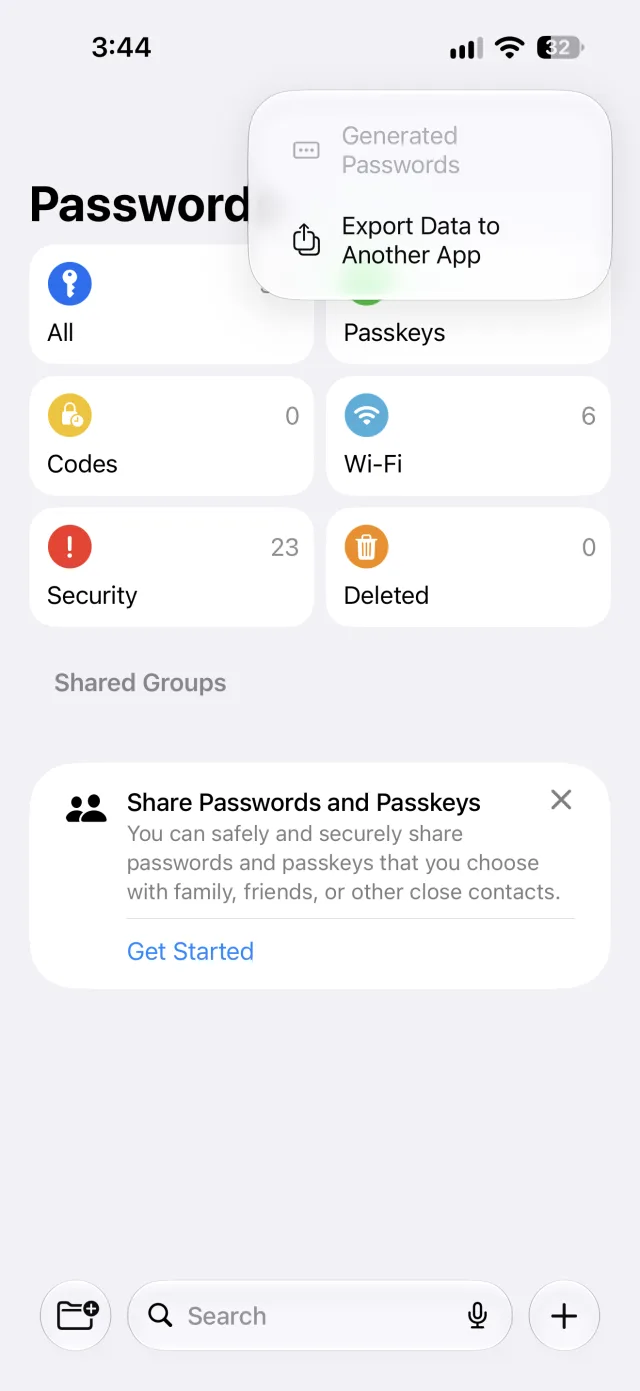
iCloud Keychain is Apple’s built-in password manager. It saves your passwords, passkeys, credit cards and Wi-Fi passwords and keeps them in sync on every iPhone, iPad, Mac and Apple Vision Pro signed in to the same Apple Account. It is free, it fills logins in Safari and apps, and since iOS 18 you see everything it stores in the Passwords app.
What iCloud Keychain syncs
According to Apple’s support page, iCloud Keychain keeps these up to date across your approved devices:
- Passwords and passkeys
- Usernames for websites in Safari and for apps
- Credit card details and security codes
- Wi-Fi passwords
It does not hold free-form secure notes, bank account details or documents.
How to turn on iCloud Keychain
- Open Settings and tap your name at the top.
- Tap iCloud.
- Tap Passwords (called Passwords and Keychain on iOS 17 and earlier).
- Turn on Sync this iPhone and enter your passcode or Apple Account password if asked.
On a Mac, the same switch is in System Settings → your name → iCloud → Passwords.
Where to see your iCloud Keychain passwords
- iOS 18 and later, macOS Sequoia and later: open the Passwords app. It has sections for all passwords, passkeys, codes, Wi-Fi and security warnings.
- iOS 17 and earlier: go to Settings → Passwords.
- Older Macs: Safari settings, Passwords tab, or the Keychain Access app.
Is iCloud Keychain safe?
Yes, for most people. Apple says iCloud Keychain is protected with end-to-end encryption, using keys tied to your devices and your device passcode, so Apple cannot read it. The weak points are the ones you control: a short device passcode, and an Apple Account without two-factor authentication. Use a strong passcode and keep two-factor authentication on.
Can you use iCloud Keychain on Windows or Android?
- Windows: yes, through Apple’s iCloud for Windows app, which includes iCloud Passwords and a browser extension for filling logins.
- Android: no. Apple has no iCloud Passwords app for Android, so the passwords and passkeys you save on your iPhone do not fill on an Android phone. Our guide to using one password manager on Android and iPhone covers the ways around this.
iCloud Keychain vs a separate password manager
| iCloud Keychain | Cross-platform manager | |
|---|---|---|
| Price | Free with any Apple device | Usually free tier plus paid plan |
| Apple devices | Built in, nothing to install | App plus AutoFill setting |
| Android | Not available | Yes |
| Windows | Through iCloud for Windows | Depends on the app |
| What it stores | Logins, passkeys, cards, Wi-Fi, 2FA codes | Often also notes, bank details and more |
If every device you own is made by Apple, iCloud Keychain is a good default. If you also use an Android phone, or share logins with someone who does, you need something that runs on both. DroidPass works on iPhone, iPad, Android and Mac, keeps passwords, passkeys, 2FA codes, cards, Wi-Fi and secure notes in one AES-256 encrypted vault, and fills them in apps and browsers on both platforms. You can move your iCloud Keychain passwords across in a few taps.
Your iPhone passwords, on Android too
DroidPass is free to start on iPhone, iPad, Android and Mac.
Download for iPhone Download for AndroidFrequently asked questions
What is iCloud Keychain?
Apple’s built-in password manager. It saves passwords, passkeys, credit cards and Wi-Fi passwords and syncs them across iPhone, iPad, Mac and Apple Vision Pro signed in to the same Apple Account.
Is iCloud Keychain the same as the Passwords app?
The Passwords app, added in iOS 18 and macOS Sequoia, is where you see and manage what iCloud Keychain stores. iCloud Keychain is the sync service underneath.
Is iCloud Keychain free?
Yes. It is included with every Apple Account.
Can I use iCloud Keychain on Android?
No. Apple does not offer iCloud Passwords for Android. To use the same passwords on an iPhone and an Android phone, move them to a password manager that runs on both.