Change your Master PIN
Changing the Master PIN re-encrypts every entry with the new PIN before it switches over. That is why it takes a moment and why the app locks itself afterwards.
Why this matters
Everything in the vault is encrypted with this PIN, so changing it is not a settings tweak — every entry is re-encrypted before the switch. That is why it takes a moment and why nobody, including support, can do it for you.
Steps
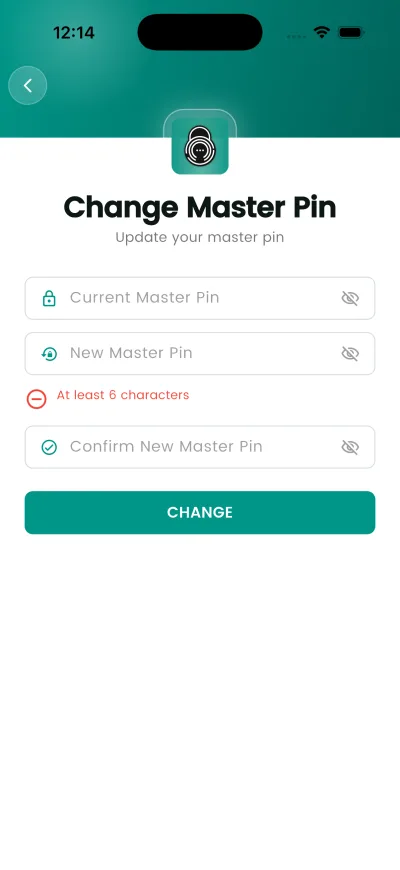
- Open Settings, then Change Master Pin.
- Current Master Pin
- New Master Pin
- Confirm New Master Pin
- Tap CHANGE and wait for the vault to finish re-encrypting.
- The app locks. Unlock it with your new PIN.
What happens next
The vault is re-encrypted with the new PIN, then the app locks itself so you sign back in with it.
If it does not work
- Some of your saved records can't be decrypted with your current Master PIN, so the change was cancelled to protect your data. Please contact support.
- This item couldn't be decrypted with your current Master PIN — it may have been saved under a different Master PIN (for example, before a PIN change). Your data is still safely stored in your account and nothing has been deleted. If you changed your Master PIN in the past, please contact support and mention any previous Master PIN you remember.
Good to know
- A Master PIN must be at least 6 characters.
- You need your current PIN to change it. There is no way round that — the vault has to be decrypted before it can be re-encrypted.
- Do not force-quit the app while it is re-encrypting.
- Update your Emergency Kit afterwards: the saved copy still shows the old PIN.
- If entries open to a blank grey screen, the PIN used to decrypt them does not match the one they were encrypted with. Recovering them needs the old PIN.